Data automation: what is it and where do you start?
Storing vast amounts of data in an easily accessible manner requires a data automation strategy. While there is a range of tools and technologies available, the goal remains the same: to make it easier to get the data you need when you need it. In this article, we’ll take a look at what data automation is, the various steps involved in the process, and how to create a data automation strategy that works for your organisation.
What is data automation?
ℹ️ Data automation is the process of leveraging technology to minimise the human intervention needed for extracting, loading and transforming data into a data warehouse and processing it for further analysis, reporting and decision-making.
Data automation platforms play a central role in data management. By automating repetitive tasks such as data loading, storage, modelling, and exporting, data automation platforms improve efficiency and consistency across data management processes. They are particularly useful for handling recurring tasks like compliance reporting for Know Your Customer (KYC) and Anti-Money Laundering (AML) requirements, where accuracy and timeliness are critical.
While some of these tasks can be performed using tools like SQL Server, data automation platforms are purpose-built to handle large-scale data operations. They provide advanced scheduling, dependency management, and monitoring capabilities, saving time and resources but also enhancing consistency in data management, helping business leaders make critical business decisions.
ETL in data automation
ETL stands for Extract, Transform, Load. It is a data integration process that involves extracting data from various sources, transforming it into a suitable format, and loading it into a data automation platform. ETL is a key component of data automation that typically happens before data enters a data automation platform.
-
Extract: The process of extracting data from various sources, such as databases, cloud storage, SharePoint, APIs, and more.
-
Transform: The process of transforming the extracted data into a suitable format for analysis. This can involve cleaning, filtering, and aggregating the data. For example, you might want to remove duplicates, fill in missing values, or convert data types.
-
Load: The process of loading the transformed data into a data warehouse or data automation tool. This can involve creating tables, inserting data, and updating existing records.
Once the data is in the platform, it can be further transformed and analysed using SQL or other programming languages.
Whilst ETL is industry standard terminology, some data automation platforms use ELT (Extract, Load, Transform) instead. The main difference is the order in which the data is transformed and loaded. In ELT, the data is first loaded into the platform and then transformed using the platform’s built-in capabilities. At Bragi, we tend to prefer an ELT approach, because it ensures you always have a copy of your source data before performing any modifications to it.
Different types of data automation technologies
There are a lot of different terminologies used in the data automation space. We’ll go over some common technologies to explain their core functionalities and how they differentiate from each other.
Data warehouse
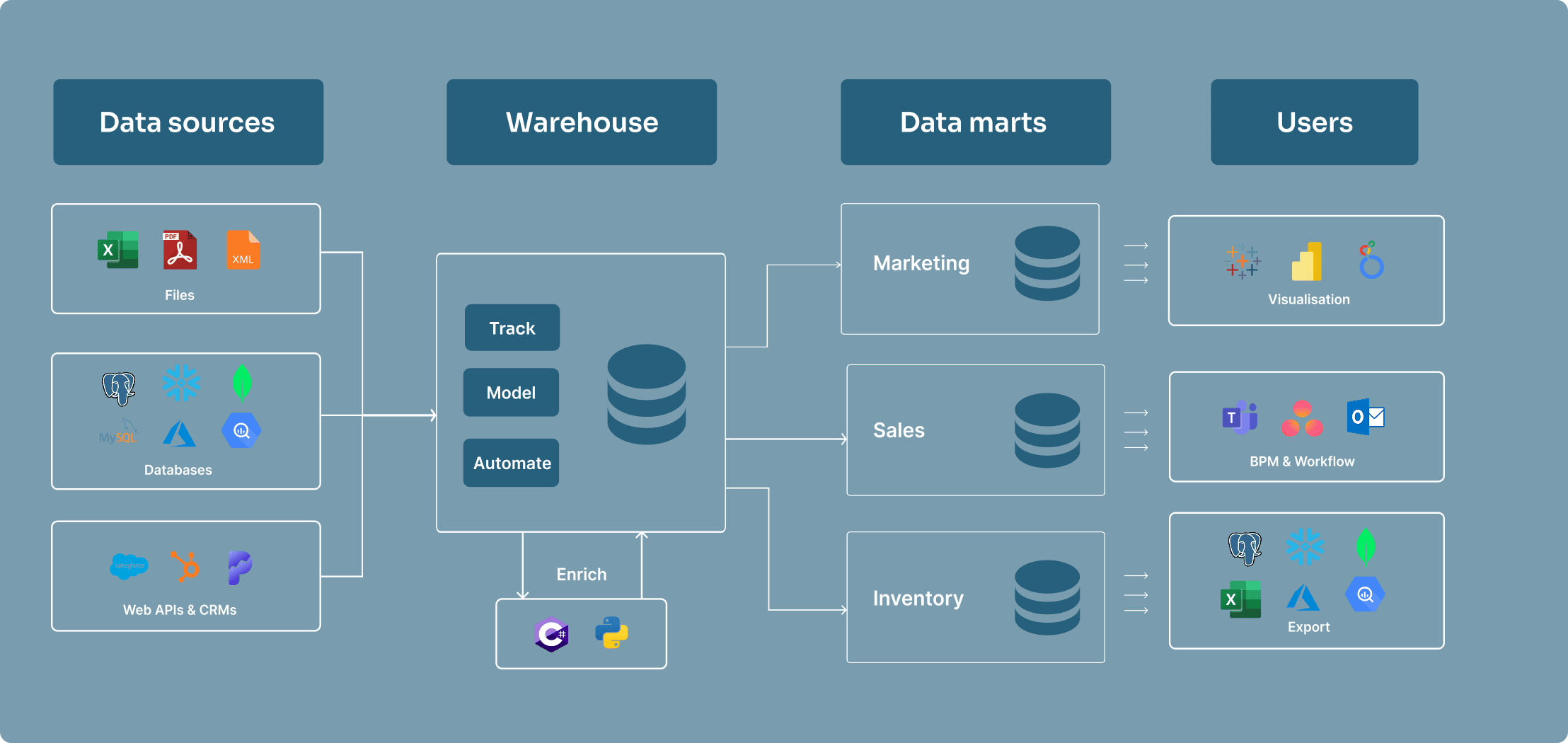
A data warehouse is a central repository of structured data from one or more disparate sources. Data warehouses store current and historical data in one single place. They are used for reporting and data analysis, and are a core component of business intelligence.
Data mart
A data mart is a small section of a data warehouse with a particular focus on the needs of a specific user or team for easy access. They are often created by extracting data from a data warehouse and transforming it into a format that is more suitable for the specific needs of sales or marketing teams, for example.
Data lake
A data lake is similar to a data warehouse, but different in a few key ways. A data lake is a storage repository that holds a vast amount of raw data in its native format until it is needed.
Data lakes can store structured data similar to a data warehouse but are mostly used for storing unstructured data (like OLAP cubes, social media streams, and IoT data). Data lakes are often used for big data analytics and machine learning. They require data engineers to make sense of the constant stream of unstructured data and can easily become tangled mess if not managed properly.
Data mesh
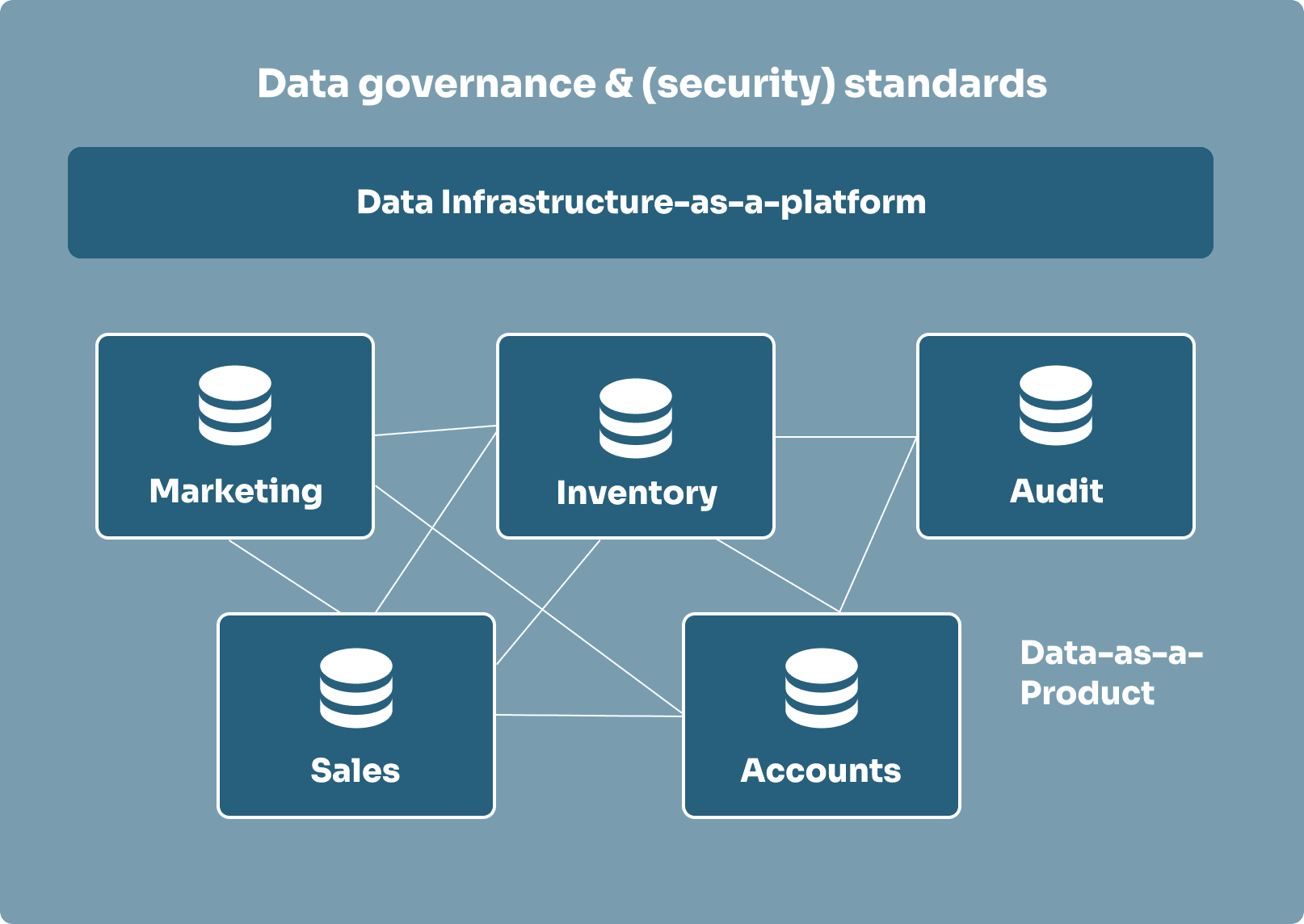
A data mesh is a decentralised way to organise data by domain (like sales, marketing, or finance) instead of by technology. Each team manages its own data as if it were a product, focusing on ensuring it is easy for others to use. In order for everything to work together, data meshes agree on federated governance and each team documents their data clearly and consistently.
How to create a data automation strategy
The sole purpose of data automation is to provide decision-makers with accurate data as efficient as possible. This is why you need to outline your objectives before you build your data automation strategy. What are you trying to achieve with your data? What questions are you asking of it? What Key Performance Indicators (KPIs) will determine the answers to those questions? Once you’ve got a clear understanding of your objectives and KPIs, you can build a data automation strategy that will get you there efficiently.
1. Audit your current data architecture
The first step in your data automation strategy should be focused on exploring your current data landscape. This means performing an audit on your current (and relevant) data. Start by looking at current accounting processes, customer relationship management (CRM) applications, logs of telephone calls, weekly email reports, or small desktop databases. While some of these may look unimportant or inaccurate, you need to understand why they exist before you disregard them.
2. Identify your core business processes
Next, you want to identify the core business processes and entities involved in creating them. For each connected data strucuture, focus on storing the KPIs for a specific business process. Make sure the KPIs are linked to the their generated factors.
To design your automation structure, determine the entities that contribute to the process. These entities form a dimensional model, where facts are stored in fact tables and related details are stored in dimensional tables.
3. Create a dimensional data model
After identifying the business processes, you can create a conceptual model of the data, determining the subjects that will be expressed as fact tables and dimensions that will relate to the facts. This process is called dimensional modelling.
These initial models have to be created with care as data warehouse and automation structures are difficult to populate and maintain. They can take a long time to construct, so careful planing in the beginning will save you from reconstructing your entire system later on.
Different types of dimensional data models
When designing the structure and relationships between fact and dimension tables, you’ll typically choose between two popular schemas: the star schema and the snowflake schema.
The star schema is straightforward, with a central fact table linked directly to various dimension tables. It’s relatively simple and easy to navigate. On the other hand, the snowflake schema takes things a step further by breaking down dimensions into additional, more detailed tables. This adds complexity but can be useful for handling more intricate data relationships.
4. Outline the amount of storage you’re going to consume
Once you’re familliar with the requirements, it’s time to think about the amount of storage the structure of your data automation platform is going to consume. Consider how you are going to archive data as time goes on. Data automation platforms retain data at various levels of granularity, as data ages, you can choose to summarise and store it with less detail. These stages can have different holding periods ranging from days, into months or years. An optimised data retention policy ensures you’re storing data efficiently while keeping it accessible.
Tip: start as a data mart and acquire more parts as you grow
Starting with a simple form of a data warehouse is a good way to get started with data automation, as it allows you to focus on a specific area of your business rather than everything at once. Over time, you can add new parts, capabilites and benefits together like a jigsaw puzzle and avoid the complexity and cost of building a full data automation platform from the start.
On-premise, cloud, or hybrid data automation?
Data automation platforms can be set up in the cloud, on-premise, or as a mixture of the two (hybrid). While on-premise platforms were the go-to choice in the past, many organisations are now embracing the flexibility and scalability of cloud-based or hybrid solutions. Below, we’ve explored the different types of hosting for data automation platforms.
On-premise data automation
On-premise data automation platforms are installed on your own servers and managed by your IT team. This means that you have complete control over the hardware and software, but it also means that you are responsible for maintaining and updating the system. On-premise data automation platforms are a good option for organisations that have strict security requirements or need to comply with regulations.
For example, if you are in the financial services industry, you may need to keep your data on-premise to comply with regulations like GDPR or PCI DSS. On-premise data automation platforms can also be a good option for organisations that have a large amount of data to process or need to integrate with legacy systems.
On-premise data automation platforms can be more expensive to implement than cloud-based solutions, as they require a larger upfront investment in hardware and software. However, they can be more cost-effective in the long run if you have a large amount of data to process or need to comply with strict security requirements.
Cloud data automation
Using cloud storage for data automation platforms is growing in popularity due to the flexibility offered by the cloud. Cloud data automation platforms are hosted in the cloud and accessed via the internet. This means that you don’t have to worry about managing hardware or software, and you can access your data from anywhere. Data automation platforms hosted in the cloud are instantly scalable, available from anywhere, and more secure than an on-premise data automation platform, which would be solely protected by an in-house IT team.
Cloud data automation platforms are a great option for organisations that want to reduce their IT costs or need to scale their data processing capabilities quickly. They are also a good option for organisations that have a large amount of data to process or need to integrate with cloud-based applications. However, if you aren’t ready to jump to the cloud just yet, many companies use a combination of data warehouse types.
Hybrid data automation
Hybrid data automation platforms combine on-premise and cloud storage. This allows you to keep sensitive data on-premise while still taking advantage of the scalability and flexibility of the cloud. Hybrid data automation platforms are a good option for organisations that are not ready to fully commit to the cloud but still want to take advantage of its benefits.
Data automation in 4 steps
Data automation platforms often have a similar set of steps that they follow to automate the data process. These steps can vary depending on the platform, but they typically include:
1. Loading data from various sources
Data automation platforms load data from a variety of systems, like OLTP, data bases, web analytics, social media, and Excel files.
2. Archiving incoming data for historic analysis or compliance
Archiving incoming data creates a detailed record of changes for any data loaded into the data automation platform. There are two different types of archiving:
-
Traditional archiving: this is a simple copy of the data that is stored in a separate location. It is used for compliance purposes and can be used to restore data if needed.
-
Type 2 change tracking archiving: this is a more complex type of archiving that tracks changes to the data over time. It is used for auditing purposes and can be used torestore data to a specific point in time.
3. Transforming data
To prepare data for reporting and analysis, data automation platforms provide you with the data modelling tools to transform data. Typically, this is done using SQL, but some platforms, also allow you to use other programming languages like C#, Python or R.
4. Scheduling data jobs to run without manual interference
Data automation platforms allow you to schedule jobs to run at specific times or intervals. This means that you can automate the data process and eliminate the need for manual intervention.
To ensure data jobs are run in the correct order, most platforms let you list the several job dependencies. Some platforms can automatically list job dependencies thanks to the underlying metadata. This is important for ensuring that data is always up-to-date and accurate.
Introduction to data automation with Bragi
In the webinar excerpt below, we explore the fundamentals of data automation using Bragi. Bragi is a comprehensive data-automation platform designed for modern enterprises, enabling teams to seamlessly ingest, model, transform and operationalise data with full transparency and repeatability.
If you’d like to dive deeper, you can contact us for access to the full webinar which includes a live demo.
Data automation is a key component in any data strategy, it streamlines processes, improves efficiency, and most importantly, makes it easier to get the data you need when you need it. Whether you’re just starting with a simple data mart or building a comprehensive data automation platform, the key is to plan carefully and adapt as your needs evolve. If you’d like to learn more about how Bragi can support your data automation journey, get access to the full webinar by contacting us today.
What is a data automation tool?
+What is a data warehouse?
+About the author

See Bragi in action
Watch the full webinar on data automation with Bragi
Get access to the full webinar including a live demo of Bragi’s data automation capabilities by contacting us today.