GUIDE
Static Data Management: A guide for regulated firms
Read how Bragi’s Static Data Management module provides a structured alternative to spreadsheet-based reference data, with built-in approval workflows, complete audit trails, and direct integration into Bragi data pipelines.
Trusted for regulated and high‑stakes data:





Introduction
If you work in a regulated financial services environment, you’ve likely seen this pattern: critical business data lives in spreadsheets. Country lists for tax reporting. Product classifications for regulatory submissions. User-to-team mappings for workflow routing. Fee schedules. Client categories. The list goes on.
These spreadsheets work, in the sense that they contain the information people need. But they create problems. Which version is current? Who made the last change and why? How do we prevent unauthorised edits? How do we integrate this data into automated workflows? When an auditor asks to see the approval trail, what do we show them?
Bragi’s Static Data Management (SDM) module addresses these problems by providing a governed environment for managing business reference data. This guide explains how it works, how it integrates with your existing processes, and how organisations are using it in practice.
What Static Data Management replaces
Static data management replaces several common patterns:
Spreadsheet-based reference data kept in shared drives, where version control is manual and approval processes are informal. Someone emails an updated country list, someone else saves it with a new filename, and six months later nobody’s quite sure which version is authoritative.
Database tables maintained by developers where business teams have to submit tickets to update classifications or add new products. The data is technically in a system, but business users can’t maintain it themselves without IT involvement.
Hardcoded mappings in transformation scripts where classification logic is embedded in code. When business rules change, developers have to modify scripts, test them, and deploy. Business knowledge lives in code rather than in business-managed tables.
Ad-hoc approval processes where someone makes a change, emails it to a colleague for review, and relies on email threads as the audit trail. This works until someone asks “who approved this and when?” and the answer requires searching through old emails.
SDM provides a structured alternative: business reference data in governed tables, with built-in approval workflows, complete audit trails, and direct integration into Bragi data pipelines.
Core capabilities
Centralised reference data
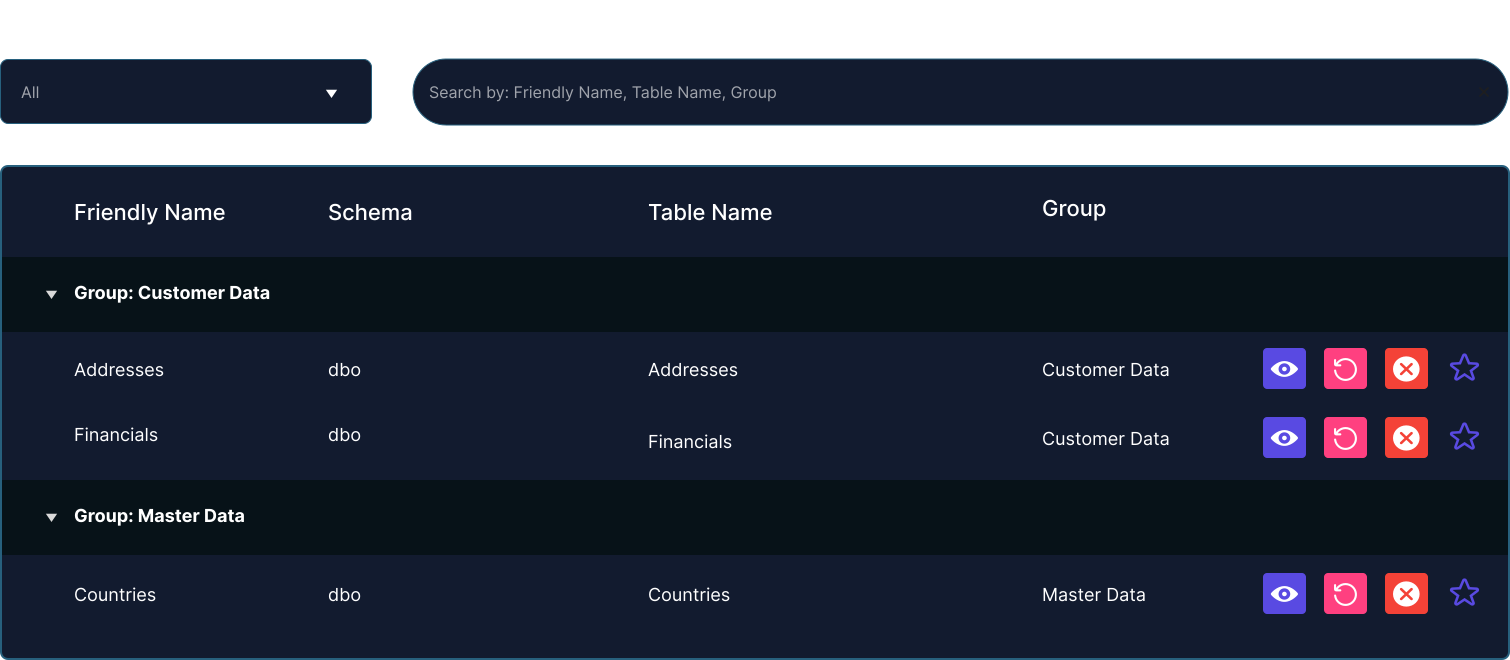
SDM provides a single location for reference data. Instead of multiple spreadsheets in different locations, you maintain tables in Bragi. Each table has a clear owner, defined structure, and controlled access.
This centralisation matters because it eliminates versioning confusion. There’s one current version, visible to everyone with appropriate permissions. When someone references a country list or product classification, they’re working from the same source as everyone else.
4-eye approval
For sensitive reference data, SDM supports 4-eye approval workflows. One person proposes a change, a second person reviews and approves it. The change only takes effect after approval.
This matters for regulated environments where segregation of duties is required. The person who maintains client fee schedules shouldn’t be the same person who approves changes. The person who updates product classifications for regulatory reporting should have their changes reviewed before they affect submissions.
The approval process is built into the module. You don’t need separate tooling or manual signoff procedures.
Complete audit trail
Every change to every record is logged. Who made the change, when they made it, what the previous value was, whether it required approval and who approved it.
This audit trail is automatic. You don’t have to remember to document changes or maintain a separate log. The system captures everything.
When an auditor asks “when did this product classification change and who authorised it?”, you can show them the exact record, the date, the approver, and any explanatory notes.
Role-based access control
Different teams need different levels of access to reference data. Tax teams maintain country lists. Operations teams maintain user mappings. Product teams maintain product classifications.
SDM lets you define who can view, edit, propose changes, or approve changes to each table. You can grant access at the table level or organise tables into projects with project-level permissions.
Integration with external identity providers (Microsoft Entra, Active Directory, Auth0) means access control aligns with your organisation’s existing user management. When someone joins the operations team, they automatically get access to the reference tables they need. When they leave, access is revoked.
Version control and rollback
SDM maintains version history for every table and every record. If a change causes problems, you can see what changed and when. If necessary, you can revert to a previous state.
This matters when changes have downstream effects. If updating a classification breaks a report, you can roll back while you investigate. The version history shows you exactly what changed between the working and broken states.
Business ownership without developer dependency
SDM is designed for business users. Tax teams can maintain their own country lists. Compliance teams can update screening parameters. Operations teams can manage workflow assignments. They don’t need to submit tickets to developers or wait for technical resources.
The interface is spreadsheet-like: rows and columns, filtering, sorting, editing. Business users who are comfortable with Excel can work with SDM tables without training on complex tools.
At the same time, all the governance features (approval, audit, version control) work automatically. Business users get autonomy without sacrificing control.
Direct integration with Bragi workflows
Reference data maintained in SDM tables is directly available in Bragi workflows. Your data pipelines can reference country lists, product classifications, user mappings, or any other reference data maintained by business teams.
When business rules change, business users update the SDM tables. The workflows automatically use the updated data on the next run. No code changes, no deployment process, no developer involvement.
This creates a clear boundary: developers build the workflows, business teams maintain the rules and reference data. Each side works within their expertise.
How organisations use SDM in practice
The case studies show three distinct patterns of SDM usage. Each addresses a different problem, but the underlying theme is consistent: moving critical reference data out of spreadsheets or code and into a governed, business-managed environment.
Pattern 1: Filling gaps in operational systems
Context: Mortgage application processing at an international bank
Problem: Salesforce stored mortgage application data but didn’t track which department each user worked in. To route applications through the right approval workflow (Sales → Onboarding → Credit), the bank needed to map Salesforce users to departments.
This mapping lived in a spreadsheet. When users changed departments or new users joined, someone updated the spreadsheet manually. The spreadsheet was then referenced by manual processes to determine workflow routing.
SDM solution: The bank created a user-to-department mapping table in SDM. Operations teams maintained the table as users joined, left, or changed roles. The Bragi workflow ingested Salesforce data, joined it to the SDM mapping table, and enriched each application record with department information.
This enabled automated routing and reporting. Applications could be automatically assigned to the correct team. Management dashboards could show application volumes by department. The mortgage backlog reduction (from 104 to 34 in two weeks) was partly enabled by this systematic workflow automation, which wasn’t possible with manual user-department mapping.
Key insight: SDM filled a gap between what the operational system provided and what the business needed. The data wasn’t complex, but it was operationally critical and needed to be business-managed with proper governance.
Pattern 2: Centralising classifications across multiple systems
Context: CRS and FATCA reporting at a multi-entity financial institution
Problem: The institution ran five separate client administration systems following acquisitions. Each system had its own approach to country classifications, product types, and relationship mappings. There was no single authoritative source.
When preparing CRS and FATCA submissions, tax teams had to navigate five different classification schemes. Country codes were inconsistent. Product classifications varied. Relationship structures were represented differently across systems.
SDM solution: The institution created central reference tables in SDM:
- Country lists with standardised codes and tax reporting attributes
- Product-to-reportable-account-type mappings
- Relationship-type classifications
Tax and compliance teams maintained these tables centrally. The Bragi workflows ingested data from all five source systems, applied the SDM-managed classifications consistently, and produced submissions following uniform rules.
When classification rules changed (new reportable product types, updated country status, revised relationship definitions), tax teams updated the SDM tables directly. The workflows automatically applied the updated rules on the next run.
Key insight: SDM provided a single source of truth for classifications that were previously fragmented. This was less about replacing spreadsheets and more about replacing inconsistent, system-specific logic with centrally-managed business rules.
Pattern 3: Business-managed transformation rules
Context: Core banking platform migration for a private bank
Problem: The migration required extensive transformation rules: how legacy account types mapped to new account structures, how product codes translated, how relationship hierarchies converted. These rules were complex and changed as testing uncovered edge cases.
If transformation logic was hardcoded in scripts, every rule change required developer involvement. Business experts would identify issues, document required changes, wait for developers to implement them, then validate the results. This was slow and created a bottleneck.
SDM solution: Transformation mappings were maintained in SDM tables. Legacy-to-new account type mappings. Product code translations. Entity relationship mappings. Business users could update these tables directly as they discovered edge cases or refined definitions.
The reconciliation workflows referenced the SDM tables when comparing legacy and migrated data. When mappings changed, the next reconciliation run automatically used the updated rules. Business experts could iterate on transformation logic without developer involvement.
Key insight: SDM enabled business experts to maintain complex mapping logic in a governed environment. The speed gain wasn’t just about eliminating spreadsheets; it was about eliminating the round-trip between business experts and developers for every rule change.
Common use cases for SDM
Based on client implementations, here are the most common applications:
Workflow automation
- User-to-team mappings (routing assignments, escalation paths)
- Client-to-relationship-manager assignments
- Department hierarchies
- Application status codes and workflow states
Why SDM works here: Operational teams understand workflow routing better than developers do. Letting them maintain the mapping tables directly reduces lag when organisational structures change.
Data quality and validation
- Valid value lists (permitted status codes, valid product types)
- Cross-reference mappings (client ID to account ID relationships)
- Business rules tables (validation thresholds, exception criteria)
- Data quality metrics and monitoring parameters
Why SDM works here: What constitutes “valid” is a business decision, not a technical one. Business teams should define and maintain validation rules rather than having them hardcoded in data quality scripts.
Financial calculations
- Fee schedules
- Commission rate tables
- Exchange rate overrides or special pricing
- Pricing tier definitions
Why SDM works here: Financial rules are commercially sensitive and change frequently. Having them in versioned, auditable tables with approval workflows provides both flexibility and control.
Client servicing
- Client categorisation schemes
- Service level definitions
- Product eligibility rules
- Communication preferences and templates
Why SDM works here: Client-facing teams need to update service parameters as offerings change. Centralised reference tables ensure consistent application across channels.
Integration with Bragi workflows
SDM tables become most valuable when they’re used by automated workflows. Here’s how that integration typically works:
Direct reference in models
Bragi workflows can reference SDM tables directly. If you’re building a CRS reporting workflow, your models can join client data to an SDM-managed country classification table. When tax teams update the country table, the workflow automatically uses the updated classifications.
This is simpler than it sounds. In the Bragi model, you reference the SDM table the same way you’d reference any other data source. The difference is that business teams can maintain the SDM table without code changes or deployments.
Dynamic business rules
Instead of hardcoding business logic in transformation models, you can externalise the rules to SDM tables. The workflow reads the rules from SDM and applies them to the data.
Example: A client screening workflow needs to route alerts to different teams based on alert type and client region. Rather than hardcoding this routing logic, you maintain a routing rules table in SDM with columns for alert type, client region, and assigned team. The workflow reads the table and routes accordingly. When routing rules change, compliance teams update the table.
Enrichment and classification
SDM tables often provide enrichment data that isn’t available in operational systems. User-to-department mappings. Product-to-regulatory-classification mappings. Client-to-risk-category assignments.
Workflows join operational data to SDM tables to add this enrichment. The operational systems provide transaction data, client data, account data. SDM provides the business context needed for reporting, compliance, or decision-making.
Parameter management
Workflows often need operational parameters: validation thresholds, time windows, retry limits, notification recipients. Rather than hardcoding these as configuration files that require developer changes, they can be maintained in SDM tables.
This allows operational teams to adjust workflow behaviour without redeployment. Need to increase a validation threshold? Update the SDM parameter table. Want to add someone to an escalation list? Add a row to the notification recipients table.
Transitioning from spreadsheets to SDM
Most organisations transition gradually rather than wholesale. The typical pattern:
Start with one high-value table
Identify a reference data set that causes pain. It’s probably something that:
- Changes frequently enough to cause version confusion
- Is used by multiple people or teams
- Requires approval but doesn’t have a formal process
- Is critical enough that errors cause problems
Common first candidates: country lists for tax reporting, user-to-team mappings for workflow routing, product classifications for regulatory submissions.
Migrate that one table into SDM. Set up appropriate permissions. Define approval workflows if needed. Integrate it into your Bragi workflows.
Demonstrate value before expanding
Run the table in SDM for at least one full cycle (whatever that means for your use case: one month, one quarter, one reporting period). Document what improved:
- Eliminated version confusion
- Reduced time to make changes
- Provided audit trail for regulatory review
- Removed developer dependency
Use this concrete evidence to justify migrating additional tables.
Build capability gradually
As teams become comfortable with SDM, they’ll identify additional reference data that should be centralised. Let this happen organically. Don’t try to migrate everything at once.
Teams will naturally recognise patterns: “We maintain this in a spreadsheet, it has the same problems we solved with SDM, we should move it.”
Maintain backwards compatibility during transition
During transition periods, you may need to support both old and new approaches. The SDM table is authoritative going forward, but legacy workflows might still reference the old spreadsheet.
Bragi can read from both sources simultaneously during the transition. Once all consumers are using SDM, decommission the spreadsheet.
Governance considerations
Defining ownership
Every SDM table needs a clear owner. Not necessarily a single person, but a clear team or function. Tax tables belong to tax teams. User mappings belong to operations. Product classifications belong to product teams.
Ownership matters because it determines:
- Who can approve changes
- Who gets notified of proposed changes
- Who is accountable for data quality
- Who answers questions about definitions
Unclear ownership leads to confusion about who can change what and why.
Approval workflows
Not every table requires 4-eye approval. Some reference data is low-risk enough that single-user updates are fine. The decision criteria:
Require approval when:
- Changes affect regulatory submissions
- Changes affect financial calculations
- Changes affect client-facing processes
- Incorrect changes would create audit or compliance issues
Single-user updates may be sufficient when:
- Data is purely informational
- Errors are easily detected and corrected
- Changes don’t propagate to external systems
- Usage is limited to internal analysis
The approval workflow can be adjusted per table based on risk.
Access control principles
Follow the principle of least privilege: grant only the access people need for their role.
-
View-only access: Teams that need to see reference data but don’t maintain it
-
Edit access: Teams that maintain data but require approval before changes take effect
-
Approve access: Senior members who review changes before they’re applied
-
Admin access: Owners who can modify table structure or permissions
Regular access reviews ensure permissions stay aligned with current roles.
Change documentation
Encourage (or require) explanatory comments when making changes. “Updated product classification per tax team guidance” or “Added new team per org restructure” provides context that pure version history can’t capture.
Six months later, when someone asks why a classification changed, the comment provides the business rationale. This is particularly valuable when the person who made the change has left the organisation.
Technical considerations
Starting from existing spreadsheets
SDM can import existing Excel files to create tables. The module auto-detects column types (text, number, date) based on content. This makes initial setup straightforward: upload the spreadsheet, review detected structure, adjust if needed, and you have a table.
The original spreadsheet remains as a historical record, but the SDM table becomes authoritative going forward.
Data types and validation
SDM supports standard data types: text, numbers, dates, boolean. Validation rules can enforce constraints: required fields, unique values, permitted value lists, numeric ranges.
This validation provides data quality control that spreadsheets lack. If a country code must be from a specific list, the table can enforce it. If a date must be in the future, the validation catches it. Errors are prevented rather than corrected after the fact.
Performance characteristics
SDM tables are optimised for reference data: relatively small datasets that change infrequently but are read frequently by workflows. Typical table sizes range from dozens to thousands of rows.
If you have reference datasets with millions of rows or very high-frequency updates, they may be better suited to database tables rather than SDM. The module is designed for business reference data rather than high-volume transactional data.
Summary
The Static Data Management module addresses a common challenge in regulated environments: managing business reference data in a way that’s both governed and business-accessible.
Spreadsheets work until they don’t. Version control breaks down. Approval processes are informal. Audit trails are reconstructed from email threads. Integration with automated workflows requires manual intervention.
SDM provides structure: centralised tables, built-in approval workflows, complete audit trails, role-based access control, and direct integration with Bragi workflows. Business teams maintain reference data within appropriate governance boundaries. Developers build workflows that automatically use updated business rules.
The case studies demonstrate three patterns: filling gaps in operational systems (mortgage processing), centralising classifications across multiple systems (tax reporting), and enabling business-managed transformation rules (platform migration). Each pattern addresses a specific problem, but the underlying value is consistent: moving critical reference data from informal, ungoverned sources into a structured, auditable environment.
If your organisation maintains important business data in spreadsheets, maintains classification logic in code, or struggles with approval trails for reference data, SDM is worth evaluating.
Next steps
Explore the case studies:
- Mortgage application processing - Using SDM for user-to-department mappings
- CRS & FATCA reporting - Using SDM for country and product classifications
- Data migration reconciliation - Using SDM for transformation mappings
Review the module page:
- Static Data Management module - Features, capabilities, and how it integrates with Bragi
Speak with our technical founders:
- Book a demo - Discuss your reference data challenges and see relevant examples
See it with your own data
Talk to us about your static data management use case
Most static data challenges are specific to the firm: the data involved, the teams maintaining it, the approval process, the audit requirements. We are happy to walk through how the module works against a concrete example from your own processes.